How Do You Start a Podcast in 2026: A Complete Guide
Most new podcasters think their passion is enough. They believe that if they just talk about something they love, an audience will magically appear. They are almost always wrong. With over 400,000 active podcasters, passion is the starting line, not the finish line. The real work is in the strategy.
To start a podcast, you must first define a specific niche and format. Then, acquire basic recording equipment and editing software, record and edit your first episodes, and create artwork. Finally, you need to choose a hosting platform to generate an RSS feed, submit that feed to directories like Apple Podcasts and Spotify, and execute a consistent launch and promotion plan. By the end of this guide, you will have a complete blueprint to launch and grow your show.
Prerequisites
- A computer with an internet connection.
- A quiet, echo-free space to record.
- A starting budget (this can range from $0 to a few thousand dollars).
Step 1: Planning Your Podcast
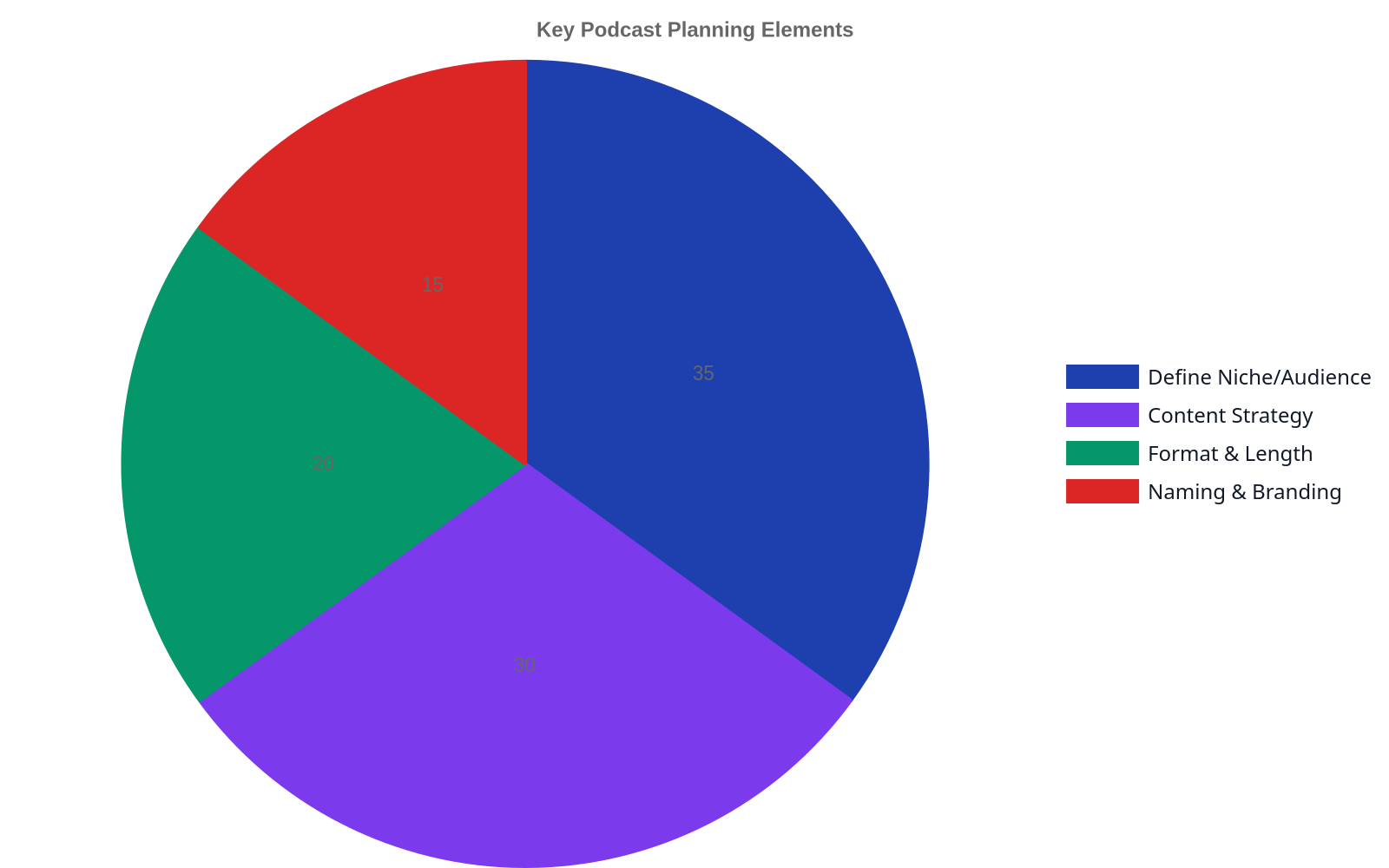

Your podcast concept is the foundation for everything that follows. Don’t just “talk about marketing.” Instead, create a show about “content marketing strategies for B2B SaaS startups.” Specificity attracts a dedicated audience. 42% of Americans listened to a podcast in the last month, so the audience is there, waiting for content that speaks directly to them.
Choose a format that aligns with your topic and your personality. Will it be solo commentary, a co-hosted discussion, an interview show, or narrative storytelling? Each has different production demands. You can explore a variety of popular podcast formats to see what fits best.
Finally, consider the legal aspects from day one. Using popular music without the right license is a quick path to a takedown notice. Understand the basics of music licensing and consider using royalty-free music libraries. The U.S. Copyright Office provides resources on music modernization and licensing.
Step 2: Choosing Your Equipment
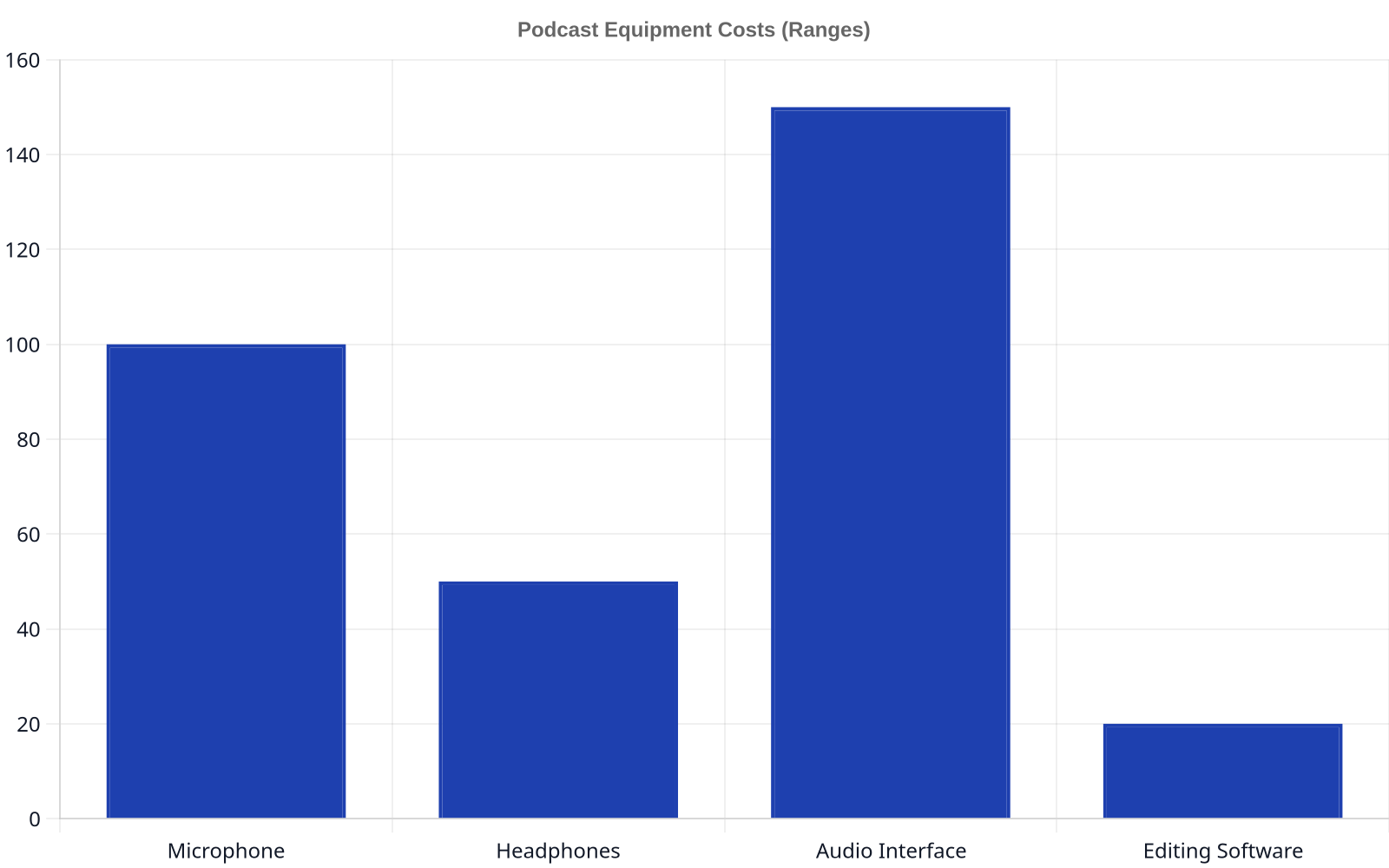
You don’t need a professional studio, but you can’t use your laptop’s internal microphone. Your budget will dictate your choices, but clear audio is non-negotiable.
- Good (Under $100): A quality USB microphone like the Blue Yeti or Audio-Technica AT2020 plugs directly into your computer. Add a pop filter to reduce plosives (the harsh ‘p’ and ‘b’ sounds).
- Better ($200+): An XLR microphone connected to an audio interface (like a Focusrite Scarlett 2i2) offers more control and superior sound quality. This is the standard for professional-sounding audio.
- Essential: A pair of closed-back headphones is critical. You need them to monitor your audio during recording and to prevent feedback.
Step 3: Selecting Software for Recording and Editing
Your software, or Digital Audio Workstation (DAW), is where you’ll record, edit, and mix your show. You have options at every price point.
- Free: Audacity is the long-standing free and open-source option. It’s powerful and cross-platform, but the user interface can feel dated.
- Subscription: Services like Descript offer a modern, transcript-based editing workflow that many beginners find intuitive. You edit the audio by editing the text.
- Professional: Tools like Hindenburg Journalist or Adobe Audition are built specifically for spoken-word and broadcast production, offering advanced features for noise reduction and mastering.
Step 4: Recording and Editing Your Podcast

Your recording space matters more than your microphone. Choose a small room with soft furnishings—carpets, curtains, even a closet full of clothes—to absorb echoes. Get close to your microphone (about 4-6 inches away) and speak consistently.
Editing is where your show comes to life. The goal is not to sound perfect, but to provide a clean, enjoyable listening experience. Remove long pauses, filler words (“um,” “ah”), and major mistakes. Add your intro/outro music and any other audio elements. While editing, create a full transcript; it’s essential for improving podcast accessibility and is the backbone of good show notes.
Step 5: Creating Your Podcast Artwork and Branding
Your podcast cover art is your digital storefront. It’s the first thing potential listeners see in directories like Apple Podcasts. It must be compelling and legible even as a tiny thumbnail.
Your artwork must be a minimum of 1400×1400 pixels and a maximum of 3000×3000 pixels, in JPG or PNG format. Use tools like Canva or hire a designer on a platform like Fiverr to create something that reflects your show’s identity. The branding should be consistent across your artwork, website, and social media profiles.
Step 6: Setting Up Your Podcast Hosting
Your audio files need a place to live online. A podcast host is a specialized service that stores your MP3s and, most importantly, generates the RSS feed that powers your podcast. You cannot simply upload audio files to your own website.
This RSS feed is what you will submit to directories. At Big Pond, we work with over 1,300+ podcasts, helping them manage their hosting and distribution. When choosing a host, look for reliable uptime, analytics, and the ability to scale as your audience grows.
Monetization isn’t a switch you flip after 10,000 downloads. It’s a strategy you build from day one, woven into your content and community.
Step 7: Publishing and Promoting Your Podcast

With your RSS feed from your host, you can now submit your show to the major podcast directories. The most important are Apple Podcasts, Spotify, and YouTube. While Apple Podcasts historically drove discovery, a recent report confirms that for many, YouTube is the #1 platform for podcast consumption in the U.S.
Don’t launch with just one episode. A “launch cluster” of 3-5 episodes gives new listeners more content to engage with and a better sense of what your show is about. This increases the chances they will subscribe and stick around.
Step 8: Marketing Your Podcast for Growth
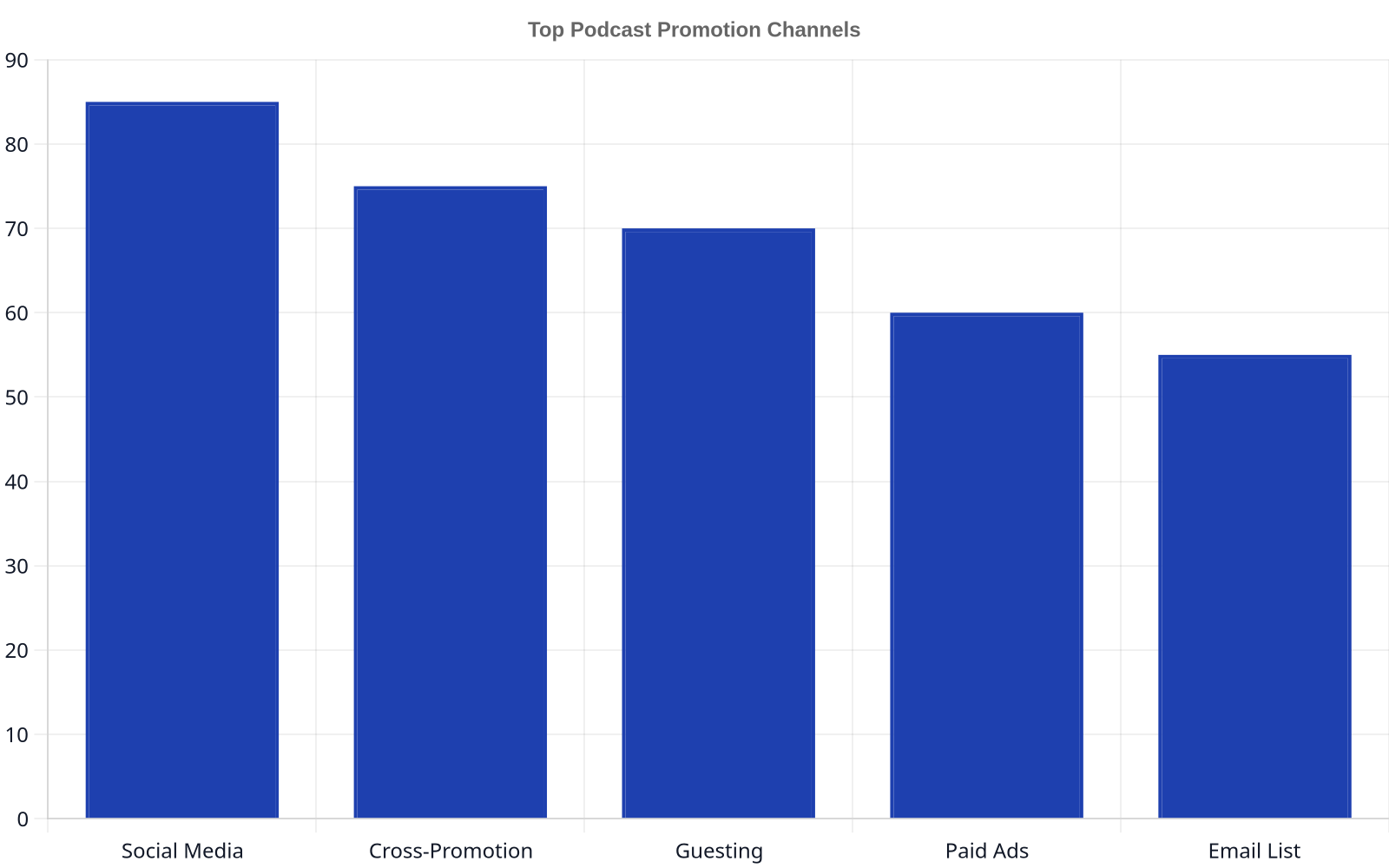
Simply publishing your podcast isn’t enough. You need a proactive marketing strategy. Podcast SEO is your first stop: use relevant keywords in your show title, episode titles, and descriptions.
Beyond that, identify 10-15 other podcasts that your ideal listener already enjoys. Reach out to their hosts for cross-promotional opportunities or to pitch yourself as a guest. Building a community around your show via a Discord server or social media group can also create a loyal following that promotes your show for you. For more ideas, see our guide on current podcast growth trends.
A successful launch isn’t about dropping one episode and hoping for the best. It’s about building a backlog and a promotion plan that gives new listeners a reason to stick around.
Step 9: Monetizing Your Show
Even as a new show, you should be thinking about monetization. This is a core part of our mission at Big Pond, where we help creators monetize and grow podcasts. Common methods include:
- Host-Read Ads: The most common format, where you read ad copy in your own voice. Our network sees an average $22.35 Avg. 60-Sec CPM for these placements.
- Affiliate Marketing: Recommending products or services and earning a commission on sales.
- Subscriptions/Premium Content: Offering bonus episodes or ad-free versions for a monthly fee via platforms like Patreon.
- Selling Your Own Products/Services: Using the podcast to drive leads for your coaching, consulting, or other business.
For a deeper look at what you can earn, our guide on podcast advertising rates provides a complete breakdown.
Troubleshooting Common Podcast Problems
- “My audio sounds bad.” This is usually due to the recording environment, not the mic. Record in a smaller, softer room and use a pop filter.
- “My download numbers are low.” Growth takes time. Focus on a specific niche and promote your show relentlessly by guesting on other podcasts.
- “I’m feeling burnt out.” Batch record your episodes to work ahead. A content calendar can help you stay organized and avoid the pressure of a weekly deadline.
Further reading
- An introduction to podcasts | Digital.gov
- How To Start a Podcast: Step-by-Step Guide for Beginners
- How to create your own podcast
- Quick Start: Podcasts!
- Should Your Company Start a Podcast?
Frequently Asked Questions
How much does it cost to start a podcast?
Costs and outcomes vary widely by scope — ask providers for figures specific to your situation.
How long should a podcast episode be?
There is no magic number. Episode length should be determined by your content and format. Daily news podcasts might be 10-15 minutes, while deep-dive interviews could be over an hour. Look at comparable shows in your niche for a baseline.
How many episodes should I have before I launch?
Launch with a minimum of three episodes. This gives new listeners a substantial amount of content to binge, making them more likely to subscribe and see the value in your show.
How do podcasts make money?
Podcasts make money through advertising (host-read or programmatic), affiliate marketing, selling premium content or subscriptions, direct listener support (like Patreon), and by driving sales for the host’s own products or services.
Do I need a website for my podcast?
While not strictly required to be listed in directories, a simple website is highly recommended. It acts as a central hub for your show notes, transcripts, host bios, and contact information, giving you a professional home base that you own and control.
How do I get my podcast on Spotify and Apple Podcasts?
First, you need a podcast hosting service. Once you upload an episode, your host will provide you with an RSS feed link. You then create an account on Spotify for Podcasters and Apple Podcasts Connect and submit that single RSS feed to each directory for approval.
What are the legal issues I should be aware of?
The biggest legal pitfalls involve copyright infringement. You must have the proper licenses to use any music in your show. Additionally, be mindful of defamation laws and ensure any claims you make are factual. Disclaimers can be useful for podcasts giving financial or medical advice.
About the author
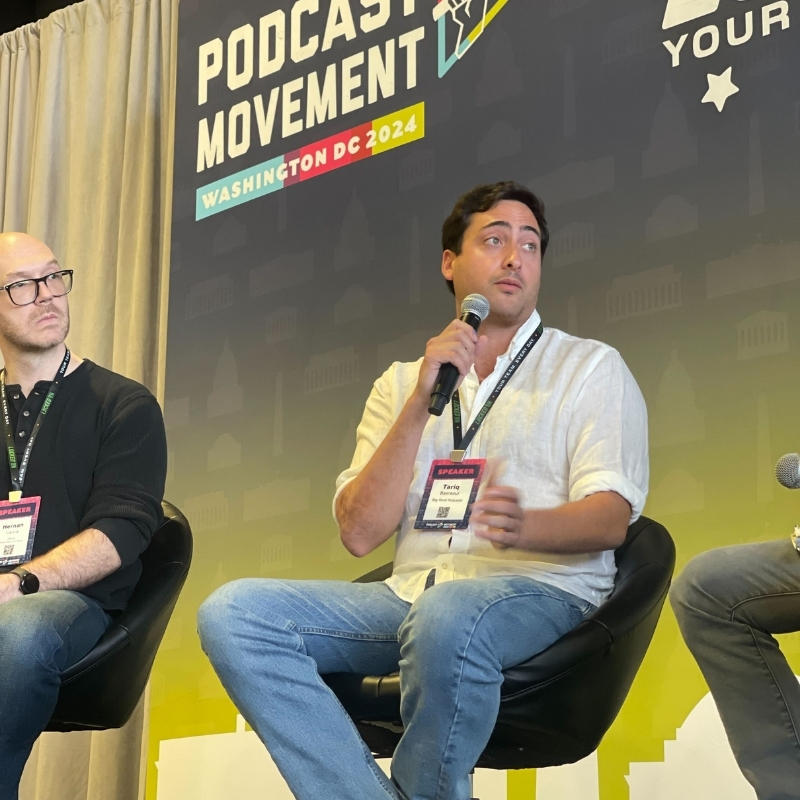
Tariq Basraoui
CEO
Tariq O’Keefe Basraoui, Co-Founder of Big Pond Podcasts, is a seasoned digital marketer and community builder with a track record of success at platforms like TikTok and Zencastr. Known for launching Zencastr’s Creator Network to over 15,000 members in 18 months, his expertise lies in growing user bases and enhancing brand engagement.
His strategic approach to growth and community engagement has established him as a leader in creating some of the fastest-growing media networks in podcasting.
