
The No-Nonsense Guide to Video Podcasting
Most podcasters believe adding video is as simple as pointing a camera at themselves while they record. They are mistaken. Going into video without a clear strategy is a surefire way to create more work with little return.
Successful video podcasting requires a deliberate approach to format, production, and distribution. It integrates visual storytelling with your audio to capture new audiences on platforms like YouTube and Spotify, creating more assets for promotion and opening powerful new monetization streams beyond traditional audio ads. This guide provides the specific equipment, software, and workflows needed to produce a high-quality video podcast that grows your brand and revenue.
The Rise of Video Podcasting
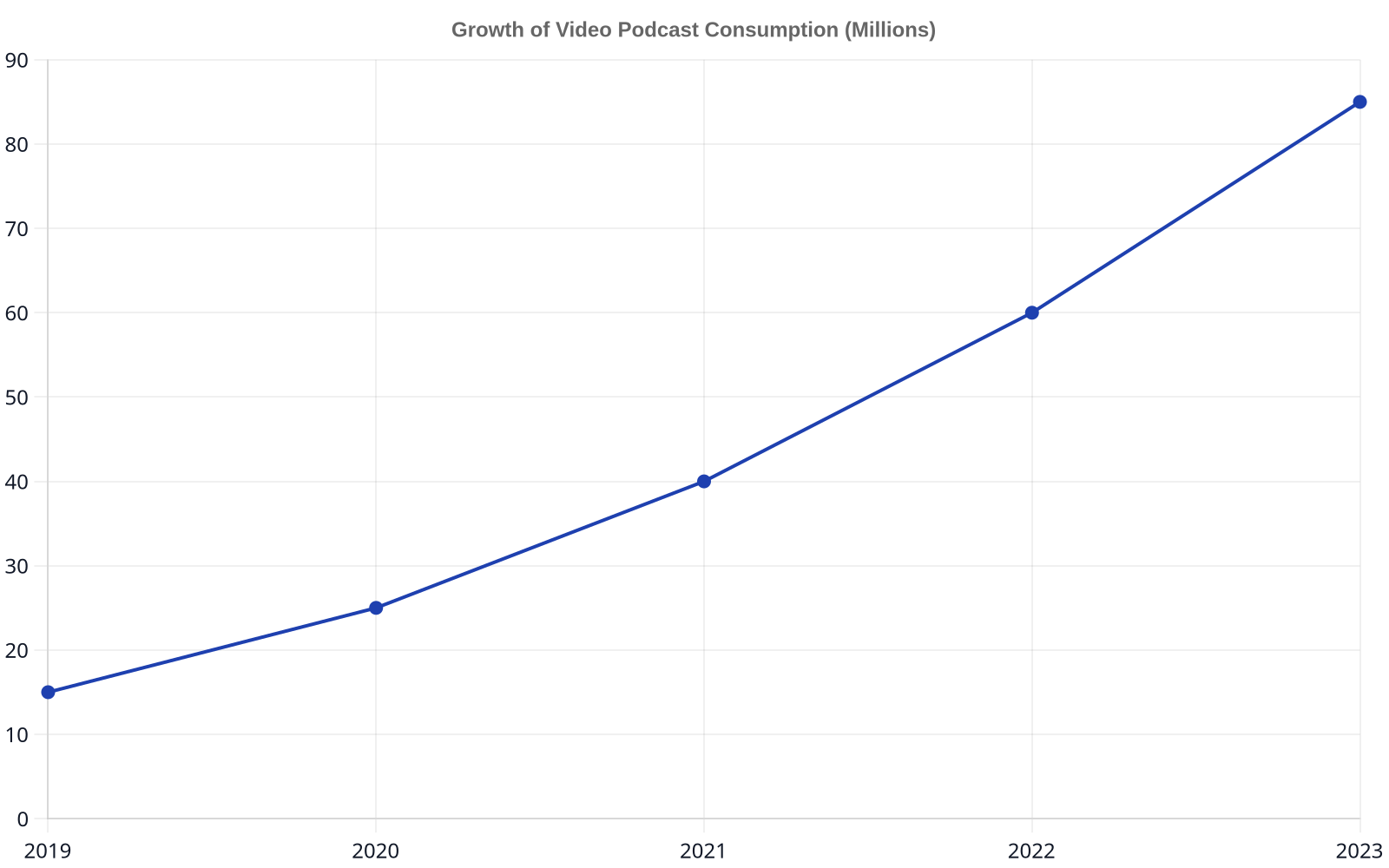
The shift to video is not a fleeting trend; it’s a response to changing audience habits. Listeners are increasingly becoming viewers, consuming their favorite shows on platforms where video is king. The data backs this up. According to a recent study, 31% of indie podcasters already produce a video version of their show, and another 32% plan to add video within the next year.
This move isn’t just about keeping up. It’s about unlocking the massive discovery engine that is YouTube and the growing video capabilities of Spotify. A video podcast gives your content a visual dimension, making it more engaging, shareable, and searchable.
Choosing the Right Video Podcast Format
Before you press record, you need to decide what your show will look like. The format you choose impacts your workflow, budget, and the kind of engagement you can expect. The right choice often depends on your content, and you can explore many popular podcast formats to find your fit.
The Solo Host
This format is the most straightforward to produce. It features a single host speaking directly to the camera, which is ideal for educational content, monologues, or news-style shows. The production is simpler, requiring only one good camera and microphone, but the pressure is all on the host to remain visually engaging.
The Interview or Co-hosted Show
Adding a second person creates a natural dynamic that is visually more interesting than a solo show. For remote interviews, this introduces the need for reliable remote recording software. For in-person shows, it requires a multi-camera setup or careful shot composition to capture both speakers effectively.
The Panel Discussion
A panel show with three or more participants is the most complex to shoot. It requires multiple cameras and microphones to cover everyone adequately. While visually dynamic, the post-production process is significantly more demanding, involving switching between camera angles to follow the conversation.
Essential Video Podcast Equipment
While you can start with a smartphone, investing in a few key pieces of gear will dramatically elevate your production quality. Your audience may forgive mediocre video, but they will not tolerate bad audio.
Cameras: From Webcam to Mirrorless
A high-quality 1080p or 4K webcam like the Logitech Brio is a good starting point. For a more professional look with a shallow depth of field, a mirrorless camera or DSLR is the next step up. Models from Sony, Canon, and Panasonic are industry standards for a reason.
Audio Still Comes First
Your existing podcast microphone is your most important piece of equipment. A great dynamic mic like a Shure SM7B or Rode Procaster will serve you well. Ensure it’s positioned correctly on a boom arm to get it close to your mouth without obstructing the video shot. Our mic faq can help you choose the right one.
Three-Point Lighting for a Professional Look
Good lighting is the single biggest differentiator between amateur and professional video. A basic three-point lighting setup consists of a key light (main light), a fill light (to soften shadows), and a back light (to separate you from the background). Affordable LED panels have made this setup accessible to creators at any budget.
Video Podcast Recording and Editing Software
The software you choose defines your production workflow. You can opt for an all-in-one platform that handles recording and basic editing or a more traditional component-based approach for maximum control.
All-in-One Platforms for Recording
Web-based studios like Riverside.fm and StreamYard have become incredibly popular for a reason. They allow you to easily record high-quality video and audio with remote guests. These platforms record each participant’s track locally, avoiding the compression artifacts and dropouts common with tools like Zoom.
Remote Interview Software
If you frequently host guests, dedicated remote interview software is non-negotiable. It ensures you receive separate, high-resolution video and audio files for each person. This gives you maximum flexibility in post-production to cut between speakers and fix any audio issues.
The Editing Suite: Choosing Your Workflow
For editing, Descript offers a revolutionary transcript-based workflow where you edit the video by editing the text. For more traditional, powerful editing, DaVinci Resolve offers a free version with professional-grade color correction and audio tools. For those already in the Apple ecosystem, Final Cut Pro is a highly optimized option.
| Feature | All-in-One Platforms (e.g., Riverside) | A La Carte Software (e.g., OBS + DaVinci) |
|---|---|---|
| Ease of Use | High (web-based, intuitive) | Low to Medium (requires setup) |
| Recording Quality | High (local recordings) | Variable (depends on settings) |
| Editing Control | Basic to Medium | Maximum Control |
| Cost | Subscription Fee | Often Free or One-time Purchase |
| Best For | Beginners, frequent remote interviews | Advanced users, complex productions |
Publishing Platforms for Your Video Podcast
Once your episode is edited, you need to get it in front of viewers. This means optimizing for the two largest video podcasting platforms: YouTube and Spotify.
Publishing Video Podcasts on YouTube
YouTube is the second-largest search engine in the world. To succeed, you must treat it as such. This means creating a compelling thumbnail, writing a keyword-rich title and description, and using relevant tags. Creating playlists for different topics on your podcast can also significantly increase session watch time, a key metric for the YouTube algorithm.
Publishing Video Podcasts on Spotify
Publishing video to Spotify requires a host that supports video podcasting. Once enabled, your video episode will be available directly within the Spotify app for listeners to either watch or listen to with audio only. It’s a powerful way to engage your existing audio audience on the platform they already use.
Navigating Video on Apple Podcasts
Apple Podcasts has supported video for years, but its implementation is less integrated than Spotify’s. Video podcasts often exist as a separate RSS feed. While it’s a valid distribution channel, most podcasters today focus their primary video efforts on YouTube and Spotify, where viewer engagement is higher.
The Importance of a Good Thumbnail
Your thumbnail is your episode’s billboard. A great thumbnail uses a high-contrast, expressive image of the host or guest, includes minimal, bold text, and stands out when viewed at a small size. This single asset is critical for driving clicks on YouTube.
Video doesn’t just capture your conversation; it captures your brand. Every background detail, every lighting choice, and every edit tells your audience who you are.
Monetization Strategies for Video Podcasters
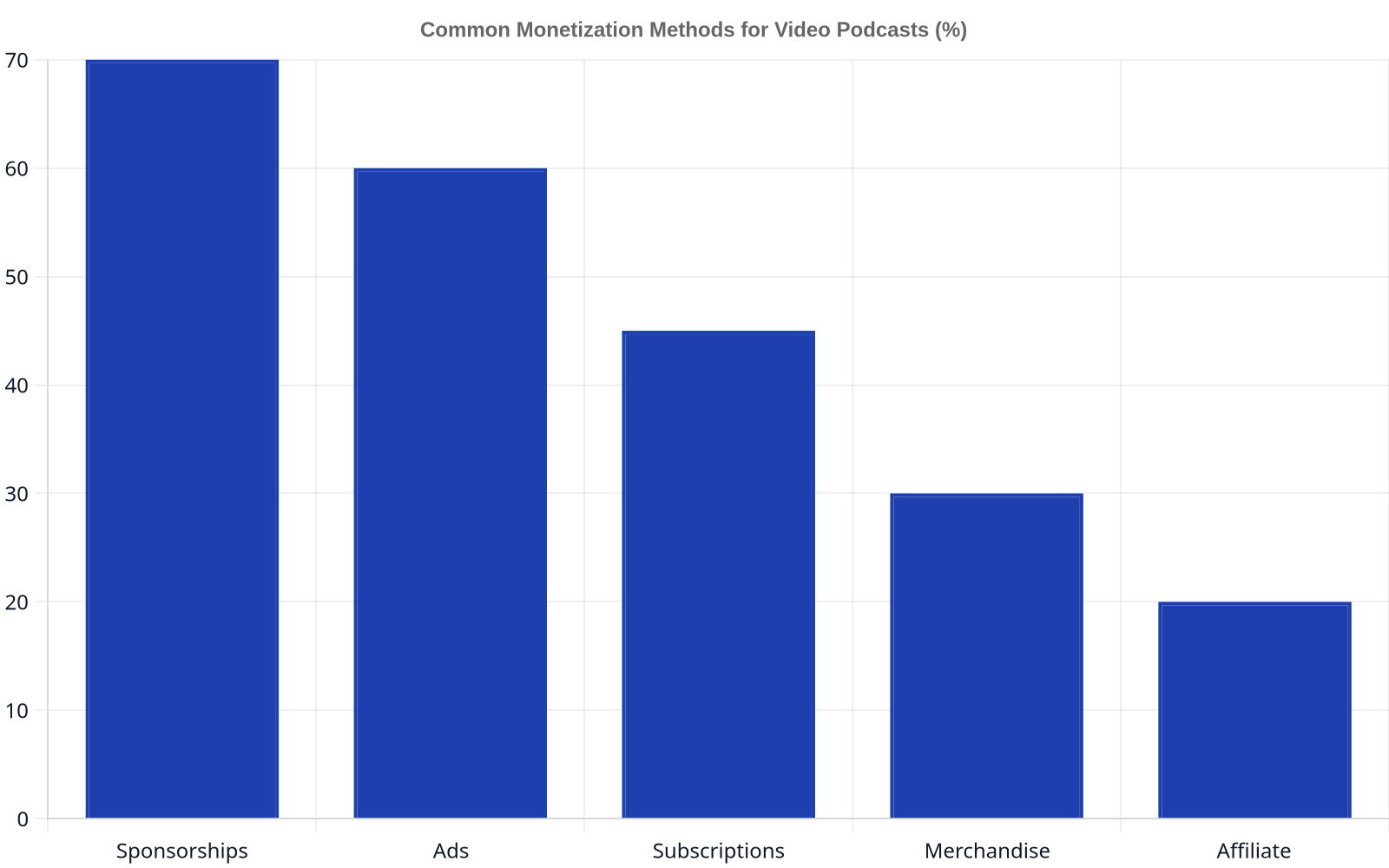
Video opens up visual avenues for monetization that audio-only podcasts can’t access. As a company that helps over 1,300+ podcasts monetize and grow, we see the impact of video firsthand. This is a core part of our mission to help creators build sustainable revenue.
YouTube Partner Program
Once your channel meets the eligibility requirements (currently 1,000 subscribers and 4,000 hours of watch time), you can apply to the YouTube Partner Program. This allows you to run pre-roll, mid-roll, and post-roll ads on your videos, creating a direct revenue stream from your views.
Visual Brand Sponsorships
Host-read ads are more powerful when you can show the product. A video integration allows you to demonstrate a product, feature a company’s branding on-screen, or even wear branded apparel. This visual element can command higher rates than audio-only ads, contributing to a strong return like our average of a $22.35 Avg. 60-Sec CPM.
Affiliate Marketing You Can Show
Instead of just telling listeners about a product, you can show them how it works. Affiliate marketing in video can include on-screen QR codes, visual demonstrations, and direct links in the video description. This makes it easier for viewers to convert, increasing your affiliate commissions. To understand the full picture, see our breakdown of podcast advertising costs.
Audience Engagement in Video Podcasting
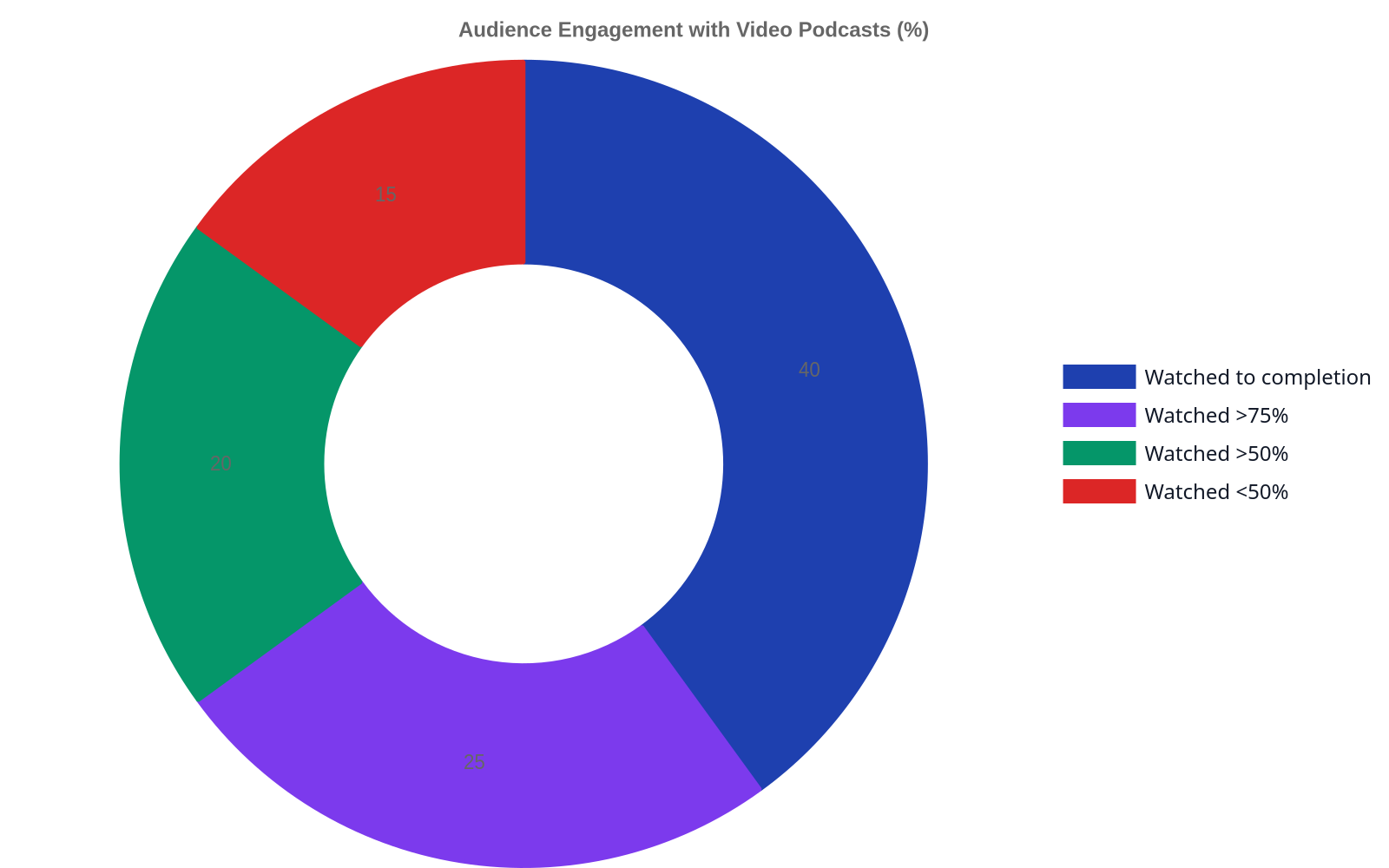
Video creates a more direct connection with your audience. You’re no longer just a voice; you’re a person on screen. This opens up new ways to build and engage your community.
Optimizing Your Videos for Search Engines (Video SEO)
Think about what your audience is searching for. Use tools like vidIQ or TubeBuddy to research keywords and optimize your titles, descriptions, and tags. A well-optimized video can rank in both YouTube and Google search results, bringing in new viewers for months or even years.
Creating Social Media Clips
Your long-form video is a goldmine for short-form content. A single one-hour podcast can be cut into dozens of 30-60 second clips for TikTok, Instagram Reels, and YouTube Shorts. These clips act as trailers for your full episode and are one of the most effective ways to promote your show.
Using Comments and Live Features
Video platforms are built for interaction. Encourage comments and ask questions to spark conversation. If you live stream your podcast recording, you can engage with your audience in real-time, answering their questions and making them part of the show.
Your most valuable promotional assets are hidden inside your long-form video. A 60-minute episode can produce ten 60-second clips that work for you all week.
Common Challenges and Troubleshooting
Transitioning to video podcasting comes with a learning curve. Here are a few common issues and how to address them.
- Audio/Video Sync Drift: This happens when your audio and video tracks slowly fall out of sync over a long recording. It’s often caused by differences in how devices record. Using a “clapper” or creating a sharp sound and visual cue (like clapping your hands on camera) at the start and end of your recording gives you a clear point to sync everything in post-production.
- Managing Large File Sizes: 4K video files are enormous. You’ll need a robust storage solution, like multiple external SSDs or a Network Attached Storage (NAS) system. A fast internet connection with high upload speed is also crucial for transferring files and publishing your episodes.
- Maintaining Visual Consistency: Your set, lighting, and camera angles should be consistent from one episode to the next. This builds brand recognition. Take photos or notes of your setup so you can replicate it perfectly every time you record.
Frequently Asked Questions
How much does it cost to start a video podcast?
You can start for under $200 with a good USB microphone and a 1080p webcam. A more professional setup with a mirrorless camera, dedicated lighting, and premium software can cost between $1,000 and $3,000. The key is to start with a solid foundation in audio and upgrade your video gear over time.
Do I need a video podcast to be successful?
No, many top podcasts are still audio-only. However, video offers a significant advantage for audience growth, discovery on platforms like YouTube, and creating promotional content. For many new creators, it’s a way to accelerate growth in a crowded market.
Can I turn my old audio episodes into videos?
Yes, you can. A common method is to create an “audiogram,” which is a static image (like your podcast cover art) with an animated waveform. While this technically creates a video file for YouTube, it doesn’t offer the engagement of a true video podcast. It’s a good starting point but shouldn’t be the long-term strategy.
What’s more important, video quality or audio quality?
Audio quality is always more important. Audiences will tolerate grainy or poorly lit video if the audio is crisp and clear. However, they will immediately click away from a video with echoing, distorted, or hard-to-hear audio. Always secure your audio first.
Adding video is a strategic decision that can dramatically expand your podcast’s reach and revenue potential. It transforms your show from a purely auditory experience into a dynamic visual brand. If you’re ready to monetize and grow your podcast through video, our team is here to help you build the right strategy.
About the author
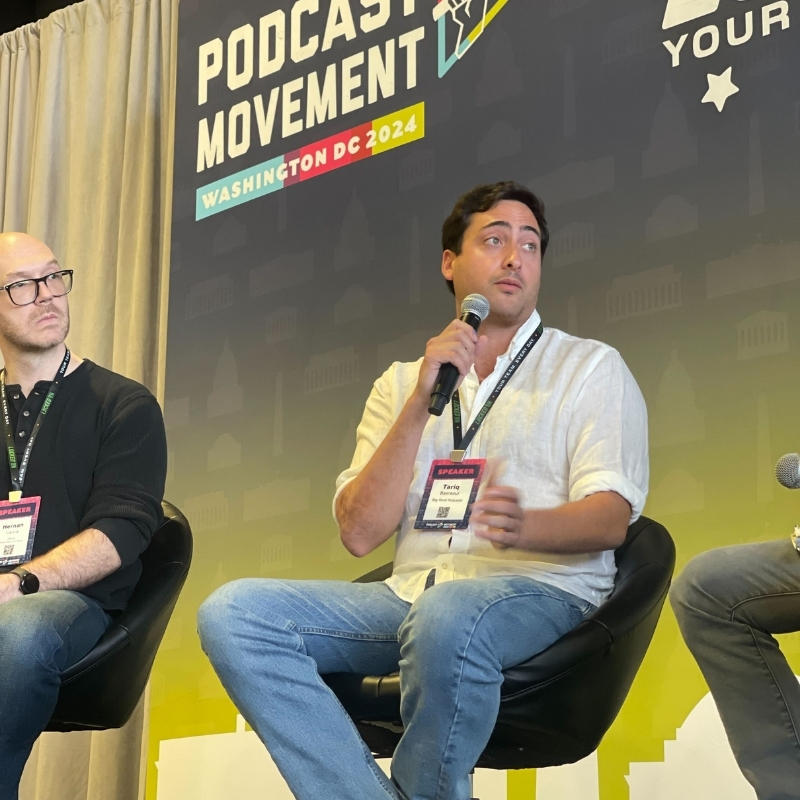
Tariq Basraoui
CEO
Tariq O’Keefe Basraoui, Co-Founder of Big Pond Podcasts, is a seasoned digital marketer and community builder with a track record of success at platforms like TikTok and Zencastr. Known for launching Zencastr’s Creator Network to over 15,000 members in 18 months, his expertise lies in growing user bases and enhancing brand engagement.
His strategic approach to growth and community engagement has established him as a leader in creating some of the fastest-growing media networks in podcasting.
